lock manager
Lock Manager
A SitecoreAI Pages plugin
See exactly which items power the page you're editing and lock or unlock them without leaving Pages.
What It Does
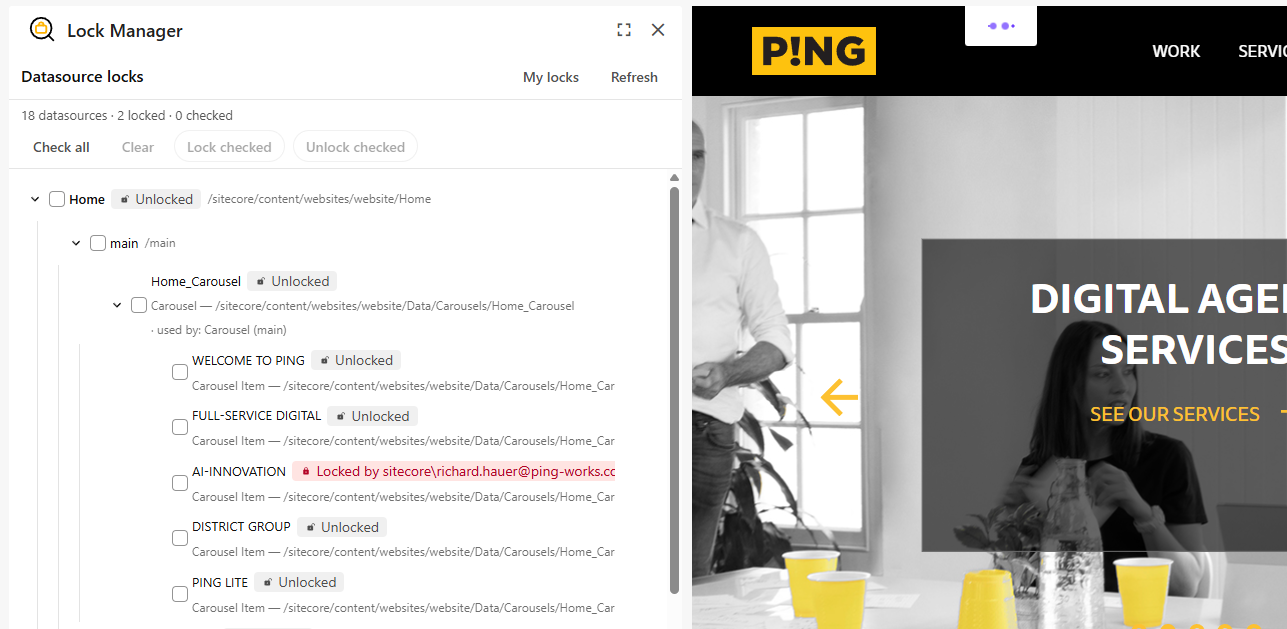
The plugin connects to SitecoreAI's page context, detects the page currently open in the Pages editor, and maps its presentation to the underlying content items. It shows which items hold the page's component datasources, where they live in the content tree, and whether they're locked and by whom, and lets authors lock or unlock them, one at a time or in bulk, directly inside the authoring experience.
Key Features
- Maps every component datasource to its item in the content tree
- Tree view mirroring the page's placeholder and rendering nesting
- Lock status at a glance showing who holds each lock
- One-click Lock / Unlock per item, with batch operations across many at once
- “Used by…” visibility so the impact of a shared datasource is clear before you lock
- Safe by design — Unlock is gated on permissions, and unreadable items never crash the tree
- Built-in loading, empty, and error states for reliable UX
Why Teams Use It
Lock Manager removes the guesswork around content ownership during authoring. Instead of hunting through the content tree to find out why an item won't save or who has it locked teams see the full picture in one panel. Editors can claim the items they're working on, release them when done, and coordinate confidently on shared content, all without leaving the SitecoreAI editor.